Google analytics v4
Prerequisites
A Google Cloud account with Viewer permissions and Google Analytics Reporting API and Google Analytics API enabled.
Setting up the Google analytics v4 connector
Basic Setup
Create a new data source
Select Google Ads
Fill in the Name and Short name
Click on “Sign in with google” from the credentials dropdown and Authenticate your account.
In another window, navigate to google analytics explorer ttps://ga-dev-tools.google/account-explorer/.
Grab the view id of the respective account and use it in view_id field.
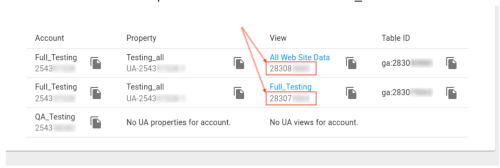
Enter the start date in the format
2017-01-25(UTC).Click on Test connection and add the data source
Add the new data source
It might take a couple of minutes to provision a new data source. Once the data source is added you will be able to query it using plain SQL
At this point, you will be able to browse the data structure of the newly added data source. Once the data source is successfully added, and you have verified it in the data browser -- you can use 3rd party tools like DBeaver to connect to the newly created data source. Refer to Using DBeaver
Detailed configuration Information
| No | Item | Required | Example | Notes |
|---|---|---|---|---|
| 1 | Credentials | Yes | Credentials for the service Refer to the documentation in the form while using the connector Authenticate via Google (Oauth)Service Account Key Authentication | |
| 2 | Replication Start Date | Yes | 2020-06-01 | The date in the format YYYY-MM-DD. Any data before this date will not be replicated. |
| 3 | View ID | Yes | The ID for the Google Analytics View you want to fetch data from. This can be found from the Google Analytics Account Explorer. | |
| 4 | Custom Reports | No | A JSON array describing the custom reports you want to sync from Google Analytics. See the docs for more information about the exact format you can use to fill out this field. | |
| 5 | Data request time increment in days | No | 30 60 90 120 200 364 | The time increment used by the connector when requesting data from the Google Analytics API. More information is available in the the docs. The bigger this value is, the faster the sync will be, but the more likely that sampling will be applied to your data, potentially causing inaccuracies in the returned results. We recommend setting this to 1 unless you have a hard requirement to make the sync faster at the expense of accuracy. The minimum allowed value for this field is 1, and the maximum is 364. |
Zipstack Cloud features a powerful SQL querying engine on top of many types of connectors, including those from Trino, some custom connectors and connectors from the open source Airbyte project. Some Zipstack cloud connectors are designed to utilize and expand upon Airbyte's connector protocol, but they do not use Airbyte's EL core. Additionally, some parts of the documentation for these connectors have been adapted from the connector documentation found in Airbyte's open source project.